
Here's what Twitch dual format streaming is, and how it works


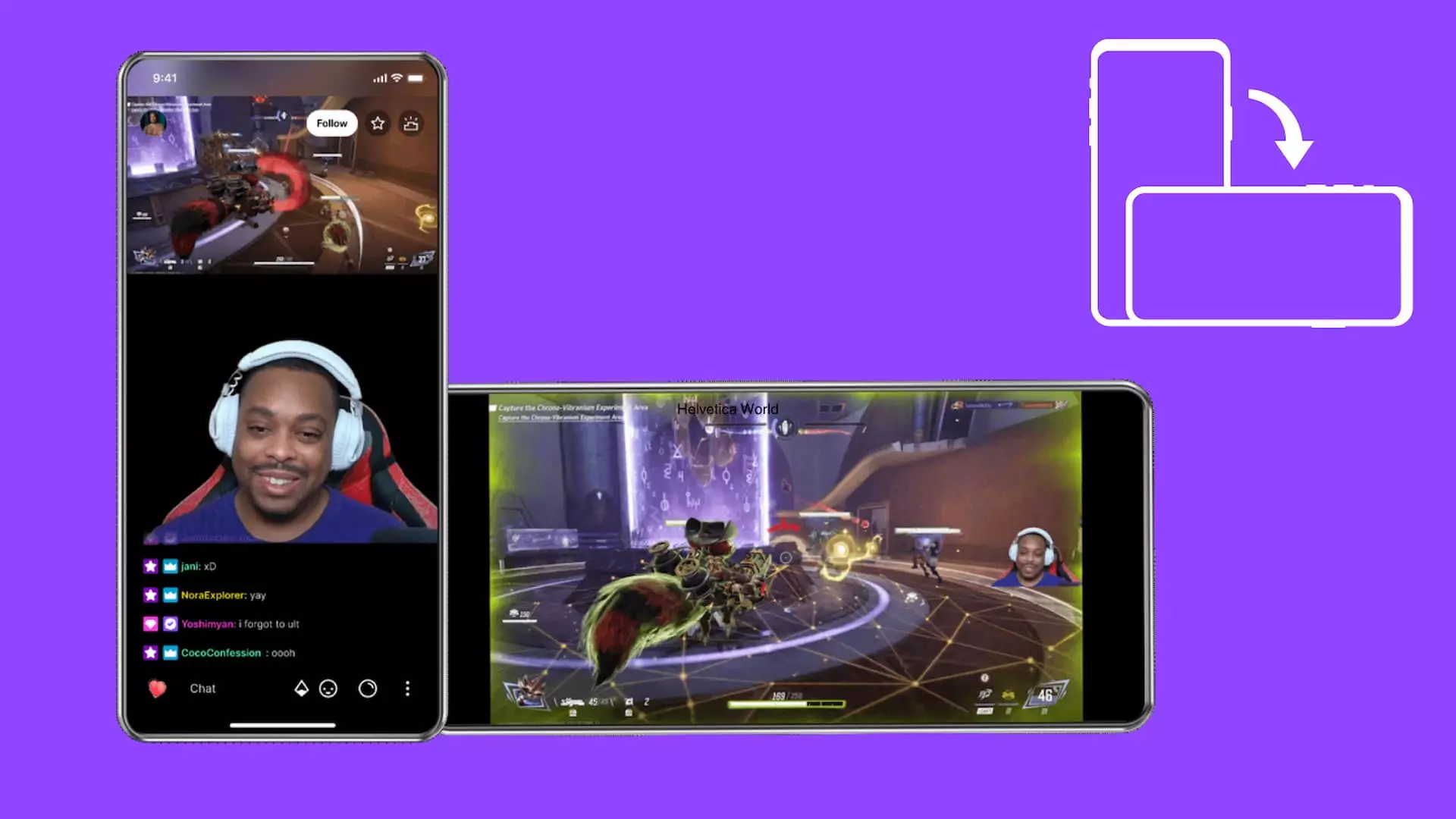
Twitch has released a new dual-format streaming option, something that could change how streams are broadcast across different devices. Here’s what dual format streaming is, and exactly how it works on Twitch.
Twitch regularly introduces fresh changes and new features to make content creation more efficient. Not everything lands, such as the new pause ads that are being tested and are receiving backlash. Twitch has now announced and started a selective rollout of dual format streaming, which will make broadcasts perfectly visible regardless of a viewer’s device type.
What is dual format streaming on Twitch?
Dual format streaming is a new feature that Twitch has introduced, allowing streamers to broadcast their content in both horizontal and vertical formats simultaneously. The idea is to make it easier for streamers on the platform to more easily and correctly show content across a variety of devices and display types.
Many viewers have had complaints that Twitch streams natively cater solely to desktop layouts, which makes watching broadcasts on mobile devices potentially problematic. The resolution for desktop is horizontal (16:9) while most mobile devices are best watched through vertical (9:16), which is why the issue arises. Twitch had previously announced that it was working on vertical streaming while discussing rewind, with the promise of both formats be able to be broadcast at the same time.

Image credit: Twitch
The dual streaming format has finally started rolling out as a beta feature, so only a limited number of streamers can currently broadcast in both formats simultaneously. All viewers can watch those select streamers broadcast dual-format content, and it works with the most popular Twitch and Kick streaming software that supports dual outputs, such as OBS and Streamlabs. The feature is designed to be efficient, and it broadcasts both formats in real-time without cropping or resizing the streams.
Many viewers prefer mobile devices over desktops in everyday use, and this new feature may potentially increase Twitch engagement as a result. Livestreaming platforms continuously try to bring in more engagement, such as Kick recently introducing a longer clip feature, and this is yet another example of that ongoing effort
Dual format streaming is also optimal for creators, as they can stream in both orientations at the same time, rather than having to cater to one demographic of viewers over another.
How to use dual format streaming
Streamers will first need to check that they are eligible for dual format streaming or join the existing waitlist, and then follow these steps to begin broadcasting content in both formats once they’re eligible.
- Ensure that the streaming software supports dual output broadcasting.
- Set up the vertical format layout using the streaming software’s built-in option or a vertical plugin.
- Test that dual format streaming is working properly.
- Start streaming.
Some streaming software, such as Streamlabs, will have a built-in option to enable vertical layout. Others like OBS will require that streamers download and use the Aitum Vertical Plugin to ensure both formats are streamed properly. Streamers must test the formats properly using Twitch Inspector after enabling dual format streaming for the first time. This way, they can find and correct any issues in advance rather than facing technical difficulties while streaming live.
Twitch recommends the following minimum specs for dual format streaming:
GPU and Driver Version:
- 1080p: NVIDIA GeForce RTX 3070 (or above) or AMD: Radeon 6700 (or above).
- 1440p: NVIDIA GeForce RTX 3080/3090/4070 (or above) or AMD: Radeon 6800 (or above).
- Operating System: Windows 10/11
Upstream Bandwidth Bitrate:
- 1080p: 13.5 Mbps
- 1440p: 22.5 Mbps or higher
Maximum Video Tracks:
- 1080p or lower: 4 or less tracks
- 1440p: 5 or less tracks
Dual format streaming on Twitch processes two different layouts simultaneously, which puts more pressure on the GPU. This is why Twitch recommends stronger GPUs to avoid issues like dropped frames. Similarly, bandwidth requirements also increase because two videos are essentially being encoded at the same time.
Streamers can try to stream with weaker internet or on lesser specs, but may face stream lag and other issues if they do.
Feature image credit: Twitch

Khizar Mundia has been playing video games for as long as he can recall. Things have come a long way since the many days he spent playing the original NES, though. He now covers a variety of competitive games and esports, as well as the world of streaming, ranging from Twitch to Kick. If it’s of interest to gamers, it’s of interest to Khizar.
View full profileRead Also
 Twitch
 GTA
GTA
 Kick
Kick
 Twitch
 Twitch
 Twitch
 Twitch