


Thunderpick is one of the leading gambling platforms, offering quality casino games and sports markets that are easily streamed on Kick, Twitch, or other operators. Multiple welcome bonuses and ongoing promos are also up for grabs.
To access these features and more, you’ll need to complete the Thunderpick registration process. If this is something that’s new to you, don’t worry, we’ve got you covered. We show you how to sign up, what requirements you’ll need to meet, and give you top troubleshooting tips.
Thunderpick Registration Requirements Explained
Thunderpick, like all top iGaming sites, has a few requirements that you’ll need to meet before you sign up. While this may seem annoying, it is done to keep you and others on the site safe. It also makes sure that Thunderpick itself complies with the regulatory requirements of its Curaçao Gaming Control Board license.
So what are these requirements? Let’s look:
- Thunderpick registration age – To register with Thunderpick, you’ll need to be 18 or older, or of legal gambling age in your country.
- Playing from unrestricted regions – Before you create an account it is worth asking where is Thunderpick legal and do I live in one of those regions. If you live in one of the site’s restricted countries, you won’t be able to register.
- One account per household – Thunderpick only allows one account per household or IP address. If someone else you live with already has an account for the site, you won’t be able to register.
- Accurate personal information – When you complete the Thunderpick sign up process, you must provide accurate personal details. If the platform finds you have provided incorrect information, you could find yourself blocked from your profile.
- Providing verification details – Lastly, Thunderpick reserves the right to ask you to provide verification documents and information at any point. If you don’t get these details in within 30 days of the request, you may find your profile gets restricted.
How to Sign Up to Thunderpick Casino
One of the things we appreciate the most about Thunderpick is that it is a crypto-based gaming site. This means you won’t have to provide heaps of personal details when you register and the process takes under a minute to get through.
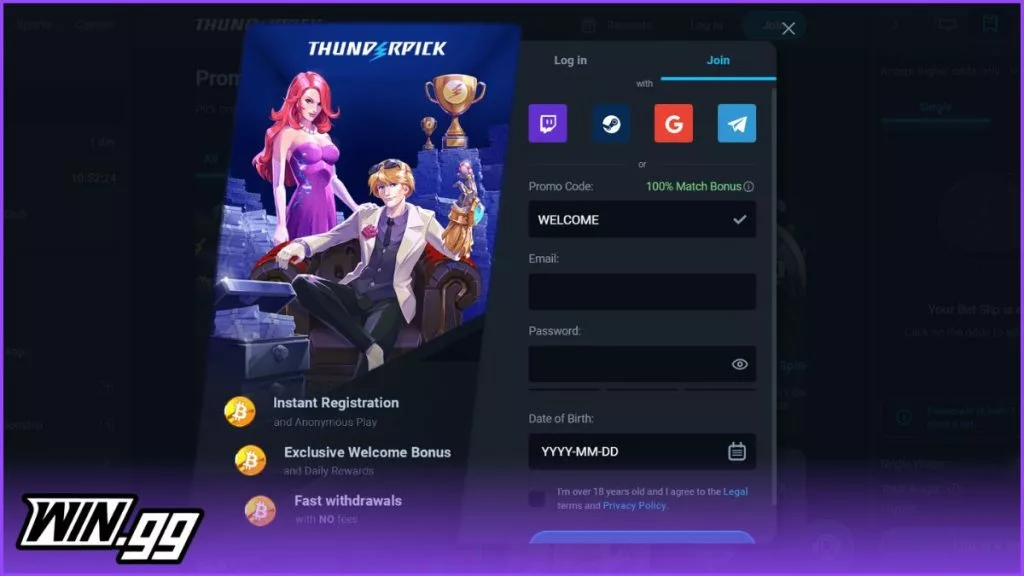
If you’ve read our Thunderpick review, you’ll also know that you won’t need to submit KYC verification details when signing up, which speeds up the process even more.
But if you haven’t signed up with a casino site before, things may still feel a little daunting. So, here’s a step-by-step guide for you to follow on how to sign up on Thunderpick so you can begin playing:
-
Use one of our on-page banners to open Thunderpick’s website. Find the blue “Join” button and select it.
-
You can now complete the Thunderpick account creation form – fill out your promo code (if you have one), email address, password, and date of birth. Next, agree to the T&Cs by checking the box, and after that, click the “join” button at the bottom of the page.
-
You will then get a pop-up window telling you your account has been successfully created. Next, hit the “Complete Registration” option at the bottom of this page.
-
Thunderpick will redirect you to a new pop-up where you can choose your welcome promo – there are two you can pick from, a casino offer and an esports promo.
-
After choosing your bonus, you can select the “Deposit” tab on this same pop-up, find the method you want to use and complete your transaction – make sure the amount you add to your account meets the bonus requirements.
-
Now you can begin playing Thunderpick slot games, live dealer options, or crash games.
Important note: If you have a Twitch, Steam, Google, or Telegram account, you can also complete your Thunderpick registration using these credentials. All you need to do is select the icon for the profile you want to use to sign up and confirm your details and that’s it.
Getting Verified at Thunderpick
You won’t need to go through a verification process when making Thunderpick deposits or withdrawals. But Thunderpick does highlight in the terms and conditions that it reserves the right to ask for KYC and verification details should it feel the need to.
If you are asked to provide verification information, here is a list of the documents you may need to submit:
- Proof of identity – Copy of your passport, driver’s license, or identity smartcard
- Proof of residence – A copy of a utility bill or a bank statement not older than 3 months
Welcome Bonuses at Thunderpick
One of the more exciting parts of the Thunderpick registration process is claiming a welcome offer. There isn’t a Thunderpick promo code you’ll need to unlock the offer (the site automatically adds this in on the registration form for you), but you will need to pick which one you want to use.
Thunderpick has two welcome offers – one for casino players and one for esports fans. Here’s what they’re all about:
- Casino welcome bonus: 100% deposit match up to €2,000 – a minimum deposit of €20 and 40x rollover requirements apply.
- Esports new user offer: 100% deposit match up to €600 – has a minimum deposit requirement of €20 and 10x wagering requirements.
Our Thunderpick Registration Troubleshooting Guide
The chances of you having a problem when completing your Thunderpick registration are slim since it’s pretty straightforward. But we did find a few hiccups you may encounter, so with that in mind, here is what they are and how to resolve them:
🟥 Restricted Country
If you try to register at Thunderpick and you can’t access the sign up form, it may be because you’re trying to join the site from a restricted country. Check the T&Cs to see whether this may be the case.
🟥 Incorrect Details
If you’ve entered in the wrong email address or credentials, your registration attempt may be rejected. Try again and double-check your details.
🟥 Existing Profile
In the instance where you already have an existing profile, Thunderpick won’t let you register a new one. Find your old credentials and log in.
🟥 Technical Problems
Sometimes the issue doesn’t lie with you at all. Thunderpick may be experiencing a technical disruption. Leave it and try again later.
Tips for a Seamless Thunderpick Sign Up Process
Signing up with Thunderpick should be a quick and painless process. Here are our top tips to keep it that way:
- Check you aren’t in a restricted country before you sign up.
- Make sure your details are accurate when you provide them.
- Double-check you don’t already have a Thunderpick profile.
- Have your crypto wallet set up before you join.
- Establish a budget for practicing responsible gaming.
Thunderpick Registration FAQs
🧾 Do I Need to Provide KYC Verification When I Register with Thunderpick?
❓ Can I Complete My Thunderpick Sign Up Using my Twitch Credentials?
🕒 How Long Does Thunderpick Registration Take?
 Simon Day
Simon has been writing about Gaming and Sports for over a decade, with his work featured in a variety of well-known gaming magazines. In 2025, he joined win.gg as an Editorial Specialist, where he continues to share his passion for the industry through insightful and well-crafted content pieces.
View full profile