
How to link your Riot Games account to Discord for League of Legends and Valorant


Riot Games has released a new feature that lets players link their Riot and Discord accounts, opening the way to new social features.
Discord is more or less the central hub for many PC gamers. Whether it’s because of the servers or just voice chat accessibility, what started as a chatting platform is now closer to a social networking platform. Because of this, it makes sense that many users have friends added on Discord who are fellow gamers.
Riot Games took note of this and let players link their Riot and Discord accounts. This direct partnership lets players access multiple quality-of-life features, though the first step is learning how to link the two accounts.
How to link League of Legends and Valorant accounts with Discord
There are three main ways to link your Riot Games and Discord account, including from the League of Legends client, the Discord app, and the Riot Games website.
The most convenient method is definitely using the Discord application. Since most PC gamers already utilize the application daily, it should not take too long to just use the in-app settings.
- Open the Discord application and log in to your account
- Click “Connections” and select the Riot Games logo
- Log in to your Riot Games account if asked
- Authorize the connection of both accounts when prompted
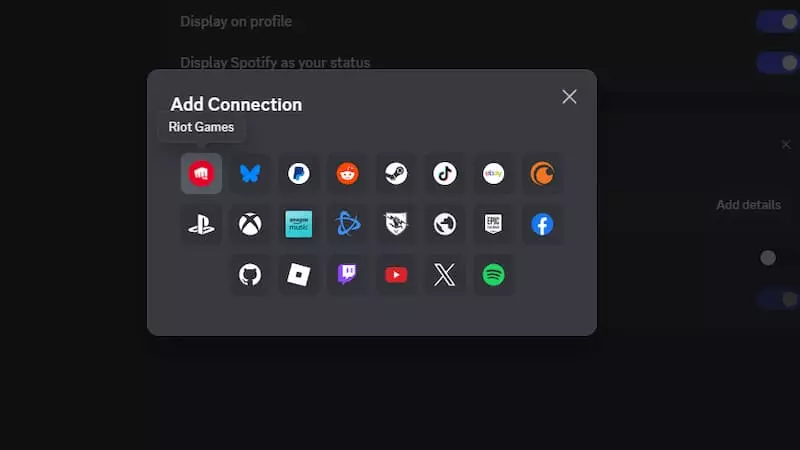
Linking Riot ID and Discord account through Discord. Image credit: Discord
The Riot Games website has a similar method of linking the two accounts. However, it’s likely the least utilized one because most players don’t usually log in to the Riot Games website, since it doesn’t really have any in-game benefits.
League of Legends players can just use the in-client option to link their Discord account directly. To do this:
- Open the League of Legends client
- Tap on the “Add Friends” option
- Select the option to link your Discord profile
- Just confirm the on-screen prompts and log in to your Discord profile if asked
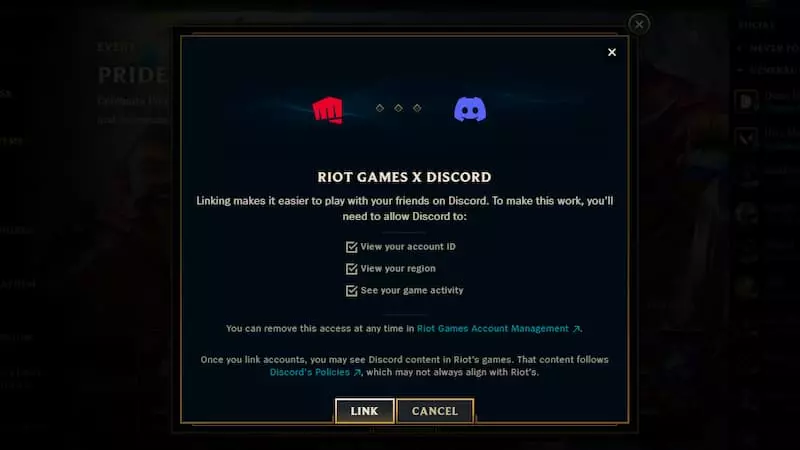
Linking Riot ID and Discord through the League of Legends client. Image credit: Riot Games
Players can only connect one Riot ID to a single Discord account. This means that those who have smurfs will have to determine which account they want to prioritize and use as their main. Additionally, the linking will affect both the League of Legends and Valorant accounts linked to the connected Riot ID.
What’s the benefit of linking your Riot Games and Discord accounts
Most of the benefits of linking your Riot Games and Discord accounts are purely social, including sharing lobby links and invites to Discord friends from the in-game clients.
The most marketed benefit is that players can invite their Discord friends directly to their in-game party without having to use Discord. At this time, only those friends who have also linked their Riot Games and Discord accounts will appear in the in-game friends section. Still, it’s a reliable way to see which friends play Riot’s games more quickly.
The official Riot Games website states that there are currently no plans to add chat functionality. This does make sense, considering most players will likely already be in the same server or voice chat when gaming.
Feature image credit: Riot Games

Hannan Mundia is a lifelong gamer. Don’t believe us? Just ask him. But don’t ask how many hours he’s spent playing. He’s been gaming since the age of three, and much of his live revolves around video games and the video game industry. Whether it’s a classic Legend of Zelda game from Nintendo, the newest Bethesda RPG, or something else entirely, you can bet that Hannan is ready and willing to play it.
View full profileRead Also
 Esports Betting
 League of Legends
 Esports Betting
 News
News
 Esports Betting
 League of Legends
 League of Legends