
How to Create a Kick Channel and Reach 10 Concurrent Viewers



The streaming space is attracting many new creators, and this guide explains how aspiring streamers can create a Kick channel and work toward reaching 10 concurrent viewers.
Many viewers assume that content creation is an easy job, but building a successful streaming career requires considerable time and effort. Creating a channel may be the easiest part of the journey, but there are many other variables involved in growing an audience. Streamers must set up their equipment to make their broadcasts visually and audibly appealing. Creators must also know how to interact with viewers to attract and retain a loyal community. Below are some of the most important steps new Kick streamers can take to reach 10 concurrent viewers.
Create your Kick channel (2-5 minutes)
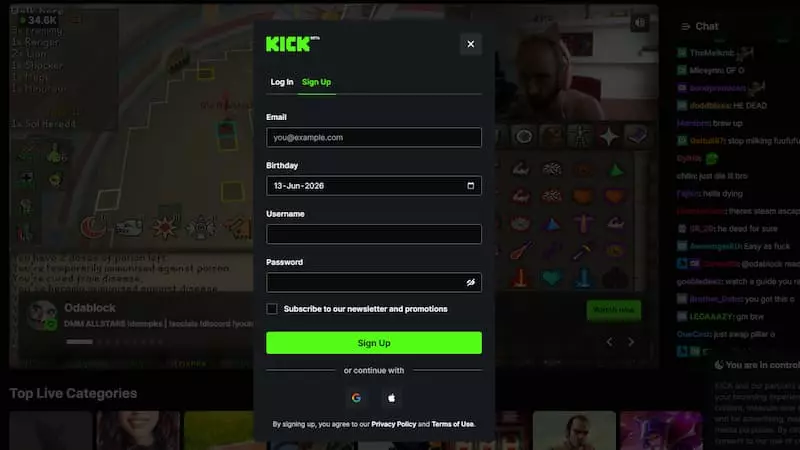
Image credit: Kick
Making a Kick channel is straightforward, and aspiring content creators can get started with streaming in just a few steps.
- Go to the Kick website or download the application
- Sign up
- Choose a unique username that you want your brand to be recognized by
- Add a profile picture
- Add a banner
- Write a bio explaining what you stream
- Add your social media handles
With these steps complete, your Kick channel has been created successfully. However, there are still some additional steps you may need to follow to actually begin streaming. If you decide to use the Kick GO Live app, it is as simple as clicking a button to start a broadcast, but streaming from a PC or laptop requires more effort.
Set up your stream

Image credit: OBS Studio
You can’t just go live and hope things will work out. There are some preparations necessary to ensure viewers can see and hear you properly, which will help your Kick channel grow.
- OBS setup: Decide which software you want to use and set it up via the stream key
- Audio: Ensure you use a good mic, so your audio is clear, and there is no echo
- Video: Stream in 720p or 1080p, and ensure the FPS is stable
- Chatbot: This may not be necessary in the beginning, but is a good optional tool for moderation
- Alerts: This is a good way to engage with viewers, as you won’t miss any notifications
Choose the right category
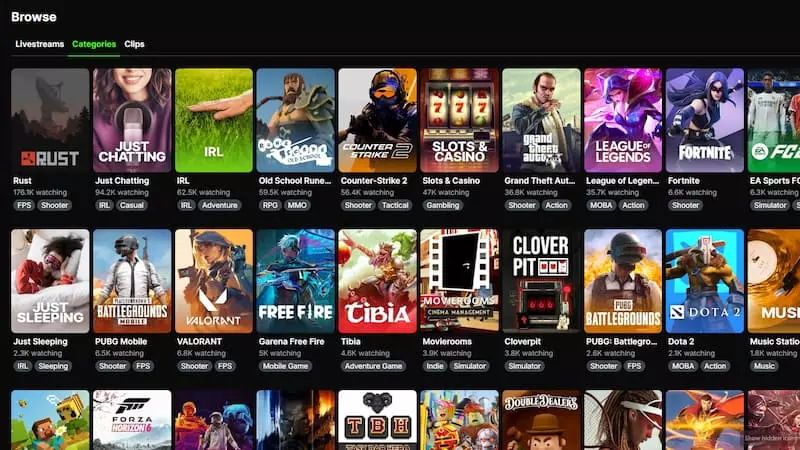
Image credit: Kick
This may be the most important step of all, as you should enjoy the niche you stream in. Viewers will notice whether you are enthusiastic or just going through the motions. The right category can also increase your visibility, especially if there is less competition.
- Smaller niches are better for new creators
- Over-saturated categories may prove to be a dead end
- Don’t copy other creators; instead develop your own style and approach
- Choose a category that you like and where you can still gain exposure
This is especially clear with the top casino streamers — they all seem to genuinely enjoy the games and interactions with their viewers. Despite it being a condensed market, they are still able to stand out by adding their unique take on the genre.
Your first-week strategy
Image credit: Kick
This is a make-or-break period for new streamers, as failing to build momentum early on may cause you to lose motivation and stop streaming altogether.
Streaming
- Stream for 2-4 hours, and don’t try to go for longer sessions
- Keep a consistent schedule
- Don’t go live at random hours
- Talk even if there are no viewers
- Get used to engaging while streaming
- Start a conversation if a viewer tunes in
Clipping
- Grab 2-3 clips per stream
- Post the clips on social media, such as X, YouTube, etc
Networking
- Connect with other smaller creators
- Raid their streams
- Chat with them when they are live
Keeping a shorter session initially will help you adjust to streaming and reduce the risk of burning out. Broadcasting at a similar time every day will help attract viewers who previously visited your stream or discovered your channel by chance. Clipping may be one of the most important elements, and Kick even has a dedicated program to support creators. Interacting with other creators is also crucial, not only for growth but also for becoming part of the community.
How to get your first 10 concurrent viewers
There is no magical method to reach 10 or any number of concurrent viewers, but there are some things you can do to increase your audience.
- ✅ Stay consistent: Stream on the same day and time, as this will increase your chances of retaining viewers
- ✅ Converse: Talk to your viewers, as this will make them engage with your streams and continue to return
- ✅ External discoverability: Try to attract viewers from other social platforms, as relying on just Kick for discoverability isn’t efficient
- ✅ Networking: Connect with other creators of your size or niche, as that can attract their viewers
Following these steps can help you increase and retain your viewership, bringing you closer to your goal of reaching 10 concurrent viewers. Kick discoverability helps, but it’s important to use other methods, which is why even bigger creators hire clippers.
You can also brainstorm unique ideas that can turn casual viewers into recurring ones. These may include challenges or riddles that you give out at the end of a stream, with the promise of an answer in your next stream. You could also add gifts or shoutouts to the mix, so viewers return in the hopes of winning. Once you build a decent viewership, you can start setting milestones for your audience, which may attract even more viewers.
Mistakes that keep creators at 0-2 viewers

Kick chat clipping feature. Image credit: Kick
Here are some mistakes that new streamers make, which can significantly limit their growth.
- ❌ Streaming at random times and not being consistent
- ❌ Not using a decent mic or having bad audio, causing viewers to leave
- ❌ Staying silent during the stream, and trying to make the visuals do the heavy lifting
- ❌ Relying on Kick for discovery
- ❌ Not clipping and sharing content on social platforms
- ❌ Focusing on too many niches in a single stream
It doesn’t matter if you are facing technical difficulties that result in poor audio quality or if you prefer to stay silent while streaming; each mistake can cost you viewers. Consistently making these mistakes can drive away even early viewers, which is why you must ensure your setup is optimal to give yourself the best chance of success. While it’s possible to stream in multiple categories as a new creator, doing so may limit your growth, and it could take much longer to build a stable audience compared to streamers who focus on one or two niches.
Realistic timeline for your Kick channel growth
| Milestone | Average Time |
|---|---|
| First follower | First stream |
| 10 followers | 2-3 weeks |
| 5 concurrent viewers | 3-6 weeks |
| 10 concurrent viewers | 2-3 months |
| First subscriber | Varies |
Summary of how to set up a successful Kick channel
This guide has shown how you can create a Kick channel and start streaming. While there is clearly no magic bullet to guarantee success and accompanying riches, the basics that we have outlined — especially around choosing your niche carefully, and making your streams entertaining as well as technically sound — will give you the best chance of success on the platform.
Feature image credit: Kick

Khizar Mundia has been playing video games for as long as he can recall. Things have come a long way since the many days he spent playing the original NES, though. He now covers a variety of competitive games and esports, as well as the world of streaming, ranging from Twitch to Kick. If it’s of interest to gamers, it’s of interest to Khizar.
View full profileRead Also
 News
News
 Kick
Kick
 Kick
Kick
 Kick
Kick
 Kick
Kick
 Casino Streamers
 Kick
Kick